Wrapping Up

My summer job as a research student of Steve Easterbrook is nearing an end. All of a sudden, I only have a few days left, and the weather is (thankfully) cooling down as autumn approaches. It feels like just a few weeks ago that this summer was beginning!

Over the past three months, I examined seven different GCMs from Canada, the United States, and Europe. Based on the source code, documentation, and correspondence with scientists, I uncovered the underlying architecture of each model. This was represented in a set of diagrams. You can view full-sized versions here:

The component bubbles are to scale (based on the size of the code base) within each model, but not between models. The size and complexity of each GCM varies greatly, as can be seen below. UVic is by far the least complex model – it is arguably closer to an EMIC than a full GCM.

I came across many insights while comparing GCM architectures, regarding how modular components are, how extensively the coupler is used, and how complexity is distributed between components. I wrote some of these observations up into the poster I presented last week to the computer science department. My references can be seen here.

A big thanks to the scientists who answered questions about their work developing GCMs: Gavin Schmidt (Model E); Michael Eby (UVic); Tim Johns (HadGEM3); Arnaud Caubel, Marie-Alice Foujols, and Anne Cozic (IPSL); and Gary Strand (CESM). Additionally, Michael Eby from the University of Victoria was instrumental in improving the diagram design.

Although the summer is nearly over, our research certainly isn’t. I have started writing a more in-depth paper that Steve and I plan to develop during the year. We are also hoping to present our work at the upcoming AGU Fall Meeting, if our abstract gets accepted. Beyond this project, we are also looking at a potential experiment to run on CESM.

I guess I am sort of a scientist now. The line between “student” and “scientist” is blurry. I am taking classes, but also writing papers. Where does one end and the other begin? Regardless of where I am on the spectrum, I think I’m moving in the right direction. If this is what Doing Science means – investigating whatever little path interests me – I’m certainly enjoying it.

Progress?

I have made slight headway regarding my installation of CESM. It still isn’t running, but now it’s not running for a different reason than previously! Progress!

It appears that, at some point while porting, I mangled the scripts/ccsm_utils/Machines/mkbatch.kate file for my machine such that the actual call to launch the model wasn’t getting copied from mkbatch.kate to test.kate.run. A bit of trial and error fixed that problem.

I finally got Torque working. The only reason that jobs were getting stuck in the queue was that I didn’t start the pbs_sched daemon! It turns out that qsub isn’t related to the problems I was having, and isn’t necessary to run the model, but it’s nice to have it working just in case I need it in the future.

So, with the relevant call in test.kate.run as

mpiexec -n 16 ./ccsm.exe >&! ccsm.log.$LID

the command line output is

Wed July 6 11:02:33 EDT 2011 -- CSM EXECUTION BEGINS HERE
Wed July 6 11:02:34 EDT 2011 -- CSM EXECUTION HAS FINISHED
ls: No match.
Model did not complete - no cpl.log file present - exiting

The only log file created is ccsm.log, and it is completely empty.

I have MPICH2 installed, the command mpiexec seems to work fine, and I have mpd running. Regardless, I tried taking out mpiexec and calling the executable directly in test.kate.run:

./ccsm.exe >&! ccsm.log.$LID

The command line output becomes

Wed July 6 11:02:33 EDT 2011 -- CSM EXECUTION BEGINS HERE
Segmentation fault.
Wed July 6 11:02:34 EDT 2011 -- CSM EXECUTION HAS FINISHED
ls: No match.
Model did not complete - no cpl.log file present - exiting

Again, ccsm.log is empty, and there seems to be no trace of why the model is failing to launch beyond Segmentation fault. The CESM guide recommends setting the stack size to unlimited, which I did to no avail. Submitting test.kate.run using qsub produces the same messages, but in the output and error files, rather than the terminal.

Thoughts?

Modularity

I’ve now taken a look at the code and structure of four different climate models: Model E, CESM, UVic ESCM, and the Met Office Unified Model (which contains all the Hadley models). I’m noticing all sorts of similarities and differences, many of which I didn’t expect.

For example, I didn’t anticipate any overlap in climate model components. I thought that every modelling group would build their own ocean, their own atmosphere, and so on, from scratch. In fact, what I think of as a “model” – a self-contained, independent piece of software – applies to components more accurately than it does to an Earth system model. The latter is more accurately described as a collection of models, each representing one piece of the climate system. Each modelling group has a different collection of models, but not every one of these models is unique to their lab.

Ocean models are a particularly good example. The Modular Ocean Model (MOM) is built by GFDL, but it’s also used in NASA’s Model E and the UVic Earth System Climate Model. Another popular ocean model is the Nucleus for European Modelling of the Ocean (NEMO, what a great acronym) which is used by the newer Hadley climate models, as well as the IPSL model from France (which is sitting on my desktop as my next project!)

Aside: Speaking of clever acronyms, I don’t know what the folks at NCAR were thinking when they created the Single Column Atmosphere Model. Really, how did they not see their mistake? And why haven’t Marc Morano et al latched onto this acronym and spread it all over the web by now?

In most cases, an Earth system model has a unique architecture to fit all the component models together – a different coupling process. However, with the rise of standard interfaces like the Earth System Modeling Framework, even couplers can be reused between modelling groups. For example, the Hadley Centre and IPSL both use the OASIS coupler.

There are benefits and drawbacks to the rising overlap and “modularity” of Earth system models. One could argue that it makes the models less independent. If they all agree closely, how much of that agreement is due to their physical grounding in reality, and how much is due to the fact that they all use a lot of the same code? However, modularity is clearly a more efficient process for model development. It allows larger communities of scientists from each sub-discipline of Earth system modelling to form, and – in the case of MOM and NEMO – make two or three really good ocean models, instead of a dozen mediocre ones. Concentrating our effort, and reducing unnecessary duplication of code, makes modularity an attractive strategy, if an imperfect one.

The least modular of all the Earth system models I’ve looked at is Model E. The documentation mentions different components for the atmosphere, sea ice, and so on, but these components aren’t separated into subdirectories, and the lines between them are blurry. Nearly all the fortran files sit in the same directory, “model”,  and some of them deal with two or more components. For example, how would you categorize a file that calculates surface-atmosphere fluxes? Even where Model E uses code from other institutions, such as the MOM ocean model, it’s usually adapted and integrated into their own files, rather than in a separate directory.

The most modular Earth system model is probably the Met Office Unified Model. They don’t appear to have adapted NEMO, CICE (the sea ice model from NCAR) and OASIS at all – in fact, they’re not present in the code repository they gave us. I was a bit confused when I discovered that their “ocean” directory, left over from the years when they wrote their own ocean code, was now completely empty! Encapsulation to the point where a component model can be stored completely externally to the structural code was unexpected.

An interesting example of the challenges of modularity appears in sea ice. Do you create a separate, independent sea ice component, like CESM did? Do you consider it part of the ocean, like NEMO? Or do you lump in lake ice along with sea ice and subsequently allow the component to float between the surface and the ocean, like Model E?

The real world isn’t modular. There are no clear boundaries between components on the physical Earth. But then, there’s only one physical Earth, whereas there are many virtual Earths in the form of climate modelling, and limited resources for developing the code in each component. In this spectrum of interconnection and encapsulation, is one end or the other our best bet? Or is there a healthy balance somewhere in the middle?

Working Away

The shape of my summer research is slowly becoming clearer. Basically, I’ll be writing a document comparing the architecture of different climate models. This, of course, involves getting access to the source code. Building on Steve’s list, here are my experiences:

NCAR, Community Earth System Model (CESM): Password-protected, but you can get access within an hour. After a quick registration, you’ll receive an automated email with a username and password. This login information gives you access to their Subversion repository. Registration links and further information are available here, under “Acquiring the CESM1.0 Release Code”.

University of Victoria, Earth System Climate Model (ESCM): Links to the source code can be found on this page, but they’re password-protected. You can request an account by sending an email – follow the link for more information.

Geophysical Fluid Dynamics Laboratory (GFDL), CM 2.1: Slightly more complicated. Create an account for their Gforge repository, which is an automated process. Then, request access to the MOM4P1 project – apparently CM 2.1 is included within that. Apparently, the server grants you request to a project, so it sounds automatic – but the only emails I’ve received from the server regard some kind of GFDL mailing list, and don’t mention the project request. I will wait and see.
Update (July 20): It looks like I got access to the project right after I requested it – I just never received an email!

Max Planck Institute (MPI), COSMOS: Code access involves signing a licence agreement, faxing it to Germany, and waiting for it to be approved and signed by MPI. The agreement is not very restrictive, though – it deals mainly with version control, documenting changes to the code, etc.

UK Met Office, Hadley Centre Coupled Model version 3 (HadCM3): Our lab already has a copy of the code for HadCM3, so I’m not really sure what the process is to get access, but apparently it involved a lot of government paperwork.

Institut Pierre Simon Laplace (IPSL), CM5: This one tripped me up for a while, largely because the user guide is difficult to find, and written in French. Google Translate helped me out there, but it also attempted to “translate” their command line samples! Make sure that you have ksh installed, too – it’s quick to fix, but I didn’t realize it right away. Some of the components for IPSLCM5 are open access, but others are password-protected. Follow the user guide’s instructions for who to email to request access.

Model E: This was the easiest of all. From the GISS website, you can access all the source code without any registration. They offer a frozen AR4 version, as well as nightly snapshots of the work-in-process for AR5 (frozen AR5 version soon to come). There is also a wealth of documentation on this site, such as an installation guide and a description of the model.

I’ve taken a look at the structural code for Model E, which is mostly contained in the file MODELE.f. The code is very clear and well commented, and the online documentation helped me out too. After drawing a lot of complicated diagrams with arrows and lists, I feel that I have a decent understanding of the Model E architecture.

Reading code can become monotonous, though, and every now and then I feel like a little computer trouble to keep things interesting. For that reason, I’m continuing to chip away at building and running two models, Model E and CESM. See my previous post for how this process started.

<TECHNICAL COMPUTER STUFF> (Feel free to skip ahead…)

I was still having trouble viewing the Model E output (only one file worked on Panoply, the rest created an empty map) so I emailed some of the lab’s contacts at NASA. They suggested I install CDAT, a process which nearly broke Ubuntu (haven’t we all been there?) Basically, because it’s an older program, it thought the newest version of Python was 2.5 – which it subsequently installed and set as the default in /usr/bin. Since I had Python 2.6 installed, and the versions are apparently very not-backwards-compatible, every program that depended on Python (i.e. almost everything on Ubuntu) stopped working. Our IT contact managed to set 2.6 back as the default, but I’m not about to try my hand at CDAT again…

I have moved forward very slightly on CESM. I’ve managed to build the model, but upon calling test.<machine name>.run, I get rather an odd error:

./Tools/ccsm_getenv: line 9: syntax error near unexpected token '('
./Tools/ccsm_getenv: line 9: 'foreach i (env_case.xml env_run.xml env_conf.xml env_build.xml env_mach_pes.xml)'

Now, I’m pretty new at shell scripting, but I can’t see the syntax error there – and wouldn’t syntax errors appear at compile-time, rather than run-time?

A post by Michael Tobis, who had a similar error, suggested that the issue had to do with qsub. Unfortunately, that meant I had to actually use qsub – I had previously given up trying to configure Torque to run on a single machine rather than many. I gave the installation another go, and now I can get scripts into the queue, but they never start running – their status stays as “Q” even if I leave the computer alone for an hour. Since the machine has a dual-core processor, I can’t see why it couldn’t run both a server and a node at once, but it doesn’t seem to be working for me.

</TECHNICAL COMPUTER STUFF>

Before I started this job, climate models seemed analogous to Antarctica – a distant, mysterious, complex system that I wanted to visit, but didn’t know how to get to. In fact, they’re far more accessible than Antarctica. More on the scale of a complicated bus trip across town, perhaps?

They are not perfect pieces of software, and they’re not very user friendly. However, all the struggles of installation pay off when you finally get some output, and open it up, and see realistic data representing the very same planet you’re sitting on! Even just reading the code for different models shows you many different ways to look at the same system – for example, is sea ice a realm of its own, or is it a subset of the ocean? In the real world the lines are blurry, but computation requires us to make clear divisions.

The code can be unintelligible (lndmaxjovrdmdni) or familiar (“The Stefan-Boltzmann constant! Finally I recognize something!”) or even entertaining (a seemingly random identification string, dozens of characters long, followed by the comment if you edit this you will get what you deserve). When you get tied up in the code, though, it’s easy to miss the bigger picture: the incredible fact that we can use the sterile, binary practice of computation to represent a system as messy and mysterious as the whole planet. Isn’t that something worth sitting and marveling over?

Climate Models on Ubuntu

Part 1: Model E

I felt a bit over my head attempting to port CESM, so I asked a grad student, who had done his Master’s on climate modelling, for help. He looked at the documentation, scratched his head, and suggested I start with NASA’s Model E instead, because it was easier to install. And was it ever! We had it up and running within an hour or so. It was probably so much easier because Model E comes with gfortran support, while CESM only has scripts written for commercial compilers like Intel or PGI.

Strangely, when using Model E, no matter what dates the rundeck sets for the simulation start and end, the subsequently generated I file always has December 1, 1949 as the start date and December 2, 1949 as the end date. We edited the I files after they were created, which seemed to fix the problem, but it was still kind of weird.

I set up Model E to run a ten-year simulation with fixed atmospheric concentration (really, I just picked a rundeck at random) over the weekend. It took it about 3 days to complete, so just over 7 hours per year of simulation time…not bad for a 32-bit desktop!

However, I’m having some weird problems with the output – after configuring the model to output files in NetCDF format and opening them in Panoply, only the file with all the sea ice variables worked. All the others either gave a blank map (array full of N/A’s) or threw errors when Panoply tried to read them. Perhaps the model isn’t enjoying having the I file edited?

Part 2: CESM

After exploring Model E, I felt like trying my hand at CESM again. Steve managed to port it onto his Macbook last year, and took detailed notes. Editing the scripts didn’t seem so ominous this time!

The CESM code can be downloaded using Subversion (instructions here) after a quick registration. Using the Ubuntu Software Center, I downloaded some necessary packages: libnetcdf-dev, mpich2, and torque-scheduler. I already had gfortran, which is sort of essential.

I used the Porting via user defined machine files method to configure the model for my machine, using the Hadley scripts as a starting point. Variables for the config_machines.xml are explained in Appendix D through H of the user’s guide (links in chapter 7). Mostly, you’re just pointing to folders where you want to store data and files. Here are a few exceptions:

  • DOUT_L_HTAR: I stuck with "TRUE", as that was the default.
  • CCSM_CPRNC: this tool already exists in the CESM source code, in /models/atm/cam/tools/cprnc.
  • BATCHQUERY and BATCHSUBMIT: the Hadley entry had “qstat” and “qsub”, respectively, so I Googled these terms to find out which batch submission software they referred to (Torque, which is freely available in the torque-scheduler package) and downloaded it so I could keep the commands the same!
  • GMAKE_J: this determines how many processors to commit to a certain task, and I wasn’t sure how many this machine had, so I just put “1”.
  • MAX_TASKS_PER_NODE: I chose "8", which the user’s guide had mentioned as an example.
  • MPISERIAL_SUPPORT: the default is “FALSE”.

The only file that I really needed to edit was Macros.<machine name>. The env_machopts.<machine name> file ended up being empty for me. I spent a while confused by the modules declarations, which turned out to refer to the Environment Modules software. Once I realized that, for this software to be helpful, I would have to write five or six modulefiles in a language I didn’t know, I decided that it probably wasn’t worth the effort, and took these declarations out. I left mkbatch.<machine name> alone, except for the first line which sets the machine, and then turned my attention to Macros.

“Getting this to work will be an iterative process”, the user’s guide says, and it certainly was (and still is). It’s never a good sign when the installation guide reminds you to be patient! Here is the sequence of each iteration:

  1. Edit the Macros file as best I can.
  2. Open up the terminal, cd to cesm1_0/scripts, and create a new case as follows: ./create_newcase -case test -res f19_g16 -compset X -mach <machine name>
  3. If this works, cd to test, and run configure: ./configure -case
  4. If all is well, try to build the case: ./test.<machine name>.build
  5. See where it fails and read the build log file it refers to for ideas as to what went wrong. Search on Google for what certain errors mean. Do some other work for a while, to let the ideas simmer.
  6. Set up for the next case: ./test.<machine name>.clean_build , cd .., and rm -rf test. This clears out old files so you can safely build a new case with the same name.
  7. See step 1.

I wasn’t really sure what the program paths were, as I couldn’t find a nicely contained folder for each one (like Windows has in “Program Files”), but I soon stumbled upon a nice little trick: look up the package on Ubuntu Package Manager, and click on “list of files” under the Download section. That should tell you what path the program used as its root.

I also discovered that setting FC and CC to gfortran and gcc, respectively, in the Macros file will throw errors. Instead, leave the variables as mpif90 and mpicc, which are linked to the GNU compilers. For example, when I type mpif90 in the terminal, the result is gfortran: no input files, just as if I had typed gfortran. For some reason, though, the errors go away.

As soon as I made it past building the mct and pio libraries, the build logs for each component (eg atm, ice) started saying gmake: command not found. This is one of the pitfalls of Ubuntu: it uses the command make for the same program that basically every other Unix-based OS calls gmake. So I needed to find and edit all the scripts that called gmake, or generated other scripts that called it, and so on. “There must be a way to automate this,” I thought, and from this article I found out how. In the terminal, cd to the CESM source code folder, and type the following:

grep -lr -e 'gmake' * | xargs sed -i 's/gmake/make/g'

You should only have to do this once. It’s case sensitive, so it will leave the xml variable GMAKE_J alone.

Then I turned my attention to compiler flags, which Steve chronicled quite well in his notes (see link above). I made most of the same changes that he did, except I didn’t need to change -DLINUX to -DDarwin. However, I needed some more compiler flags still. In the terminal, man gfortran brings up a list of all the options for gfortran, which was helpful.

The ccsm build log had hundreds of undefined reference errors as soon as it started to compile fortran. The way I understand it, many of the fortran files reference each other, but gfortran likes to append underscores to user-defined variables, and then it can’t find the file the variable is referencing! You can suppress this using the flag -fno-underscoring.

Now I am stuck on a new error. It looks like the ccsm script is almost reaching the end, as it’s using ld, the gcc linking mechanism, to tie all the files together. Then the build log says:

/usr/bin/ld: seq_domain_mct.o(.debug_info+0x1c32): unresolvable R_386_32 relocation against symbol 'mpi_fortran_argv_null'
/usr/bin/ld: final link failed: Nonrepresentable section on output
collect2: ld returned 1 exit status

I’m having trouble finding articles on the internet about similar errors, and the gcc and ld manpages are so long that trying every compiler flag isn’t really an option. Any ideas?

Update: Fixed it! In scripts/ccsm_utils/Build/Makefile, I changed LD := $(F90) to LD := gcc -shared. The build was finally successful! Now off to try and run it…

The good thing is that, since I re-started this project a few days ago, I haven’t spent very long stuck on any one error. I’m constantly having problems, but I move through them pretty quickly! In the meantime, I’m learning a lot about the model and how it fits everything together during installation. I’ve also come a long way with Linux programming in general. Considering that when I first installed Ubuntu a few months ago, and sheepishly called my friend to ask where to find the command line, I’m quite proud of my progress!

I hope this article will help future Ubuntu users install CESM, as it seems to have a few quirks that even Mac OS X doesn’t experience (eg make vs gmake). For the rest of you, apologies if I have bored you to tears!

Models and Books

Working as a summer student continues to be rewarding. I get to spend all day reading interesting things and playing with scientific software. What a great deal!

Over the weekend, I ran the “Global Warming_01” simulation from EdGCM, which is an old climate model from NASA with a graphical user interface. Strangely, they don’t support Linux, as their target audience is educators – I doubt there are very many high school teachers running open-source operating systems! So I ran the Windows version on my laptop, and it took about 36 hours. It all felt very authentic.

Unfortunately, as their Windows 7 support is fairly new, there were some bugs in the output. It refused to give me any maps at all! The terminal popped up for a few seconds, but it didn’t output any files. All I could get were zonal averages (and then only from January-March) and time series. Also, for some reason, none of the time series graphs had units on the Y axis. Anyway, here are some I found interesting:

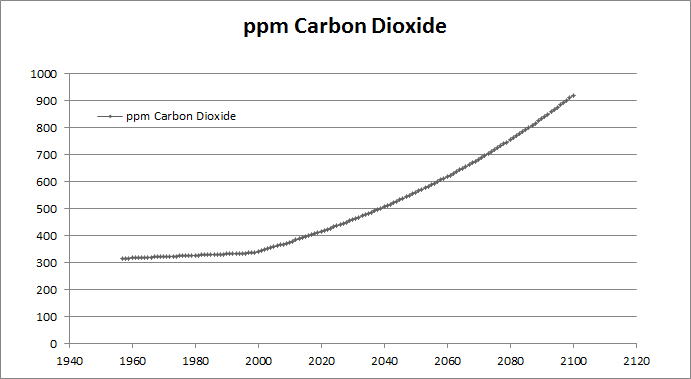
CO2 concentrations increase linearly from 1958 to 2000, and then exponentially until 2100, with a doubling of CO2 (with respect to 1958) around 2062. (This data was output as a spreadsheet, and I got Excel to generate the graph, so it looks nicer than the others.)

Global cloud cover held steady until around 2070, when it decreased. I can’t figure out why this would be, as the water vapour content of the air should be increasing with warming – wouldn’t there be more clouds forming, not less?

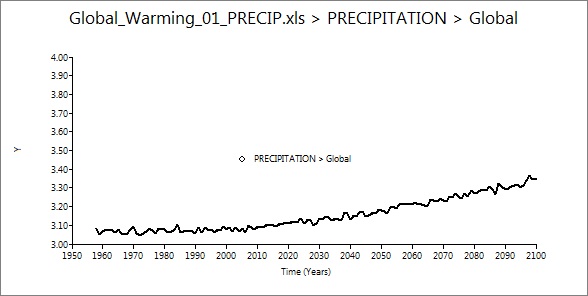
Global precipitation increased, as I expected. This is an instance where I wish the maps would have worked, because it would be neat to look at how precipitation amount varied by location. I’ve been pretty interested in subtropical drought recently.

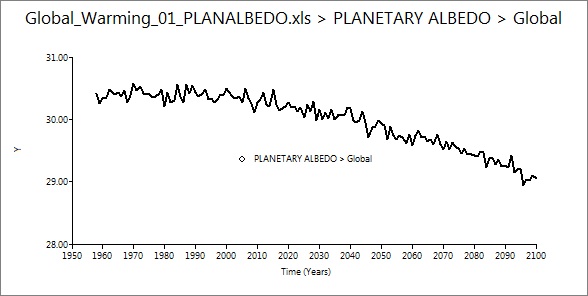
Albedo decreased about 1% – a nice example of the ice-albedo feedback (I presume) in action.

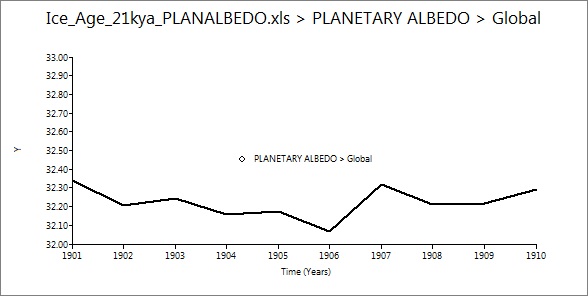
I also ran a simulation of the Last Glacial Maximum, from 21 thousand years ago. This run was much quicker than the first, as (since it was modeling a stable climate) it only simulated a decade, rather than 150 years. It took a few hours, and the same bugs in output were apparent. Time series graphs are less useful when studying stable conditions, but I found the albedo graph interesting:

Up a few percent from modern values, as expected.

It’s fairly expensive to purchase a licence for EdGCM, but they offer a free 30-day trial that I would recommend. I expect that it would run better on a  Mac, as that’s what they do most of the software development and testing on.

Now that I’ve played around with EdGCM, I’m working on porting CESM to a Linux machine. There’s been trial and error at every step, but everything went pretty smoothly until I reached the “build” phase, which requires the user to edit some of the scripts to suit the local machine (step 3 of the user guide). I’m still pretty new to Linux, so I’m having trouble working out the correct program paths, environment variables, modules, and so on. Oh well, the more difficult it is to get working, the more exciting it is when success finally comes!

I am also doing lots of background reading, as my project for the summer will probably be “some sort of written something-or-other” about climate models. Steve has a great collection of books about climate change, and keeps handing me interesting things to read. I’m really enjoying The Warming Papers, edited by David Archer and Ray Pierrehumbert. The book is a collection of landmark papers in climate science, with commentary from the editors. It’s pretty neat to read all the great works – from Fourier to Broecker to Hansen – in one place. Next on my list is A Vast Machine by Paul Edwards, which I’m very excited about.

A quick question, unrelated to my work – why do thunderstorms tend to happen at night? Perhaps it’s just a fluke, but we’ve had a lot of them recently, none of which have been in the daytime. Thoughts?

Beautiful Things

This is what the last few days have taught me: even if the code for climate models can seem dense and confusing, the output is absolutely amazing.

Late yesterday I discovered a page of plots and animations from the Canadian Centre for Climate Modelling and Analysis. The most recent coupled global model represented on that page is CGCM3, so I looked at those animations. I noticed something very interesting: the North Atlantic, independent of the emissions scenario, was projected to cool slightly, while the world around it warmed up. Here is an example, from the A1B scenario. Don’t worry if the animation is already at the end, it will loop:

It turns out that this slight cooling is due to the North Atlantic circulation slowing down, as is very likely to happen from large additions of freshwater that change the salinity and density of the ocean (IPCC AR4 WG1, FAQ 10.2). This freshwater could come from either increased precipitation due to climate change, or meltwater from the Arctic ending up in the North Atlantic. Of course, we hear about this all the time – the unlikely prospect of the Gulf Stream completely shutting down and Europe going into an ice age, as displayed in The Day After Tomorrow – but, until now, I hadn’t realized that even a slight slowing of the circulation could cool the North Atlantic, while Europe remained unaffected.

Then, in chapter 8 of the IPCC, I read something that surprised me: climate models generate their own El Ninos and La Ninas. Scientists don’t understand quite what triggers the circulation patterns leading to these phenomena, so how can they be in the models? It turns out that the modellers don’t have to parameterize the ENSO cycles at all: they have done such a good job of reproducing global circulation from first principles that ENSO arises by itself, even though we don’t know why. How cool is that? (Thanks to Jim Prall and Things Break for their help with this puzzle.)

Jim Prall also pointed me to an HD animation of output from the UK-Japan Climate Collaboration. I can’t seem to embed the QuickTime movie (WordPress strips out some of the necessary HTML tags) so you will have to click on the link to watch it. It’s pretty long – almost 17 minutes – as it represents an entire year of the world’s climate system, in one-hour time steps. It shows 1978-79, starting from observational data, but from there it simulates its own circulation.

I am struck by the beauty of this output – the swirling cyclonic precipitation, the steady prevailing westerlies and trade winds, the subtropical high pressure belt clear from the relative absence of cloud cover in these regions. You can see storms sprinkling across the Amazon Basin, monsoons pounding South Asia, and sea ice at both poles advancing and retreating with the seasons. Scientists didn’t explicitly tell their models to do any of this. It all appeared from first principles.

Take 17 minutes out of your day to watch it – it’s an amazing stress reliever, sort of like meditation. Or maybe that’s just me…

One more quick observation: most of you are probably familiar with the naming conventions of IPCC reports. The First Assessment Report was FAR, the second was SAR, and so on, until the acronyms started to repeat themselves, so the Fourth Assessment Report was AR4. They’ll have to follow this alternate convention until the Eighth Annual Report, which will be EAR. Maybe they’ll stick with AR8, but that would be substantially less entertaining.

Learning Experiences

I apologize for my brief hiatus – it’s been almost two weeks since I’ve posted. I have been very busy recently, but for a very exciting reason: I got a job as a summer student of Dr. Steve Easterbrook! You can read more about Steve and his research on his faculty page and blog.

This job required me to move cities for the summer, so my mind has been consumed with thoughts such as “Where am I and how do I get home from this grocery store?” rather than “What am I going to write a post about this week?” However, I have had a few days on the job now, and as Steve encourages all of his students to blog about their research, I will use this outlet to periodically organize my thoughts.

I will be doing some sort of research project about climate modelling this summer – we’re not yet sure exactly what, so I am starting by taking a look at the code for some GCMs. The NCAR Community Earth System Model is one of the easiest to access, as it is largely an open source project. I’ve only read through a small piece of their atmosphere component, but I’ve already seen more physics calculations in one place than ever before.

I quickly learned that trying to understand every line of the code is a silly goal, as much as I may want to. Instead, I’m trying to get a broader picture of what the programs do. It’s really neat to have my knowledge about different subjects converge so completely. Multi-dimensional arrays, which I have previously only used to program games of Sudoku and tic-tac-toe, are now being used to represent the entire globe. Electric potential, a property I last studied in the circuitry unit of high school physics, somehow impacts atmospheric chemistry. The polar regions, which I was previously fascinated with mainly for their wildlife, also present interesting mathematical boundary cases for a climate model.

It’s also interesting to see how the collaborative nature of CESM, written by many different authors and designed for many different purposes, impacts its code. Some of the modules have nearly a thousand lines of code, and some have only a few dozen – it all depends on the programming style of the various authors. The commenting ranges from extensive to nonexistent. Every now and then one of the files will be written in an older version of Fortran, where EVERYTHING IS IN UPPER CASE.

I am bewildered by most of the variable names. They seem to be collections of abbreviations I’m not familiar with. Some examples are “mxsedfac”, “lndmaxjovrdmdni”, “fxdd”, and “vsc_knm_atm”.

When we get a Linux machine set up (I have heard too many horror stories to attempt a dual-boot with Windows) I am hoping to get a basic CESM simulation running, as well as EdGCM (this could theoretically run on my laptop, but I prefer to bring that home with me each evening, and the simulation will probably take over a day).

I am also doing some background reading on the topic of climate modelling, including this book, which led me to the story of PHONIAC. The first weather prediction done on a computer (the ENIAC machine) was recreated as a smartphone application, and ran approximately 3 million times faster. Unfortunately, I can’t find anyone with a smartphone that supports Java (argh, Apple!) so I haven’t been able to try it out.

I hope everyone is having a good summer so far. A more traditional article about tornadoes will be coming at the end of the week.